What causes the squiggly Pure Signal Amp View?
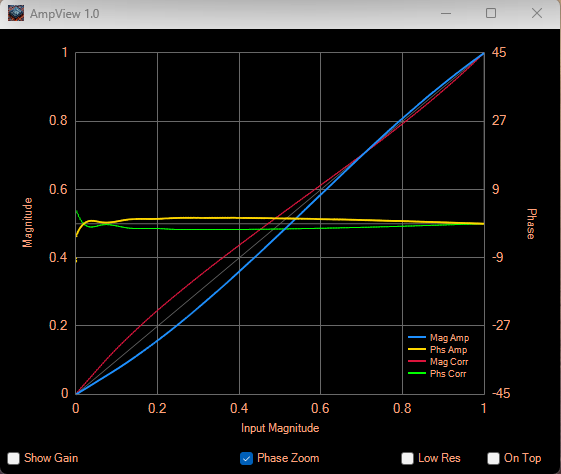
On occasion, my 7000 MKIII experiences an odd looking Amp View when doing a two tone P.S. calibration. I have seen other examples of this sort of Amp View by others but always with a different twist than I am seeing. Here's my normal Amp View on 80 meters, external (or internal) coupler at 50 watts out, dummy load, no external amplifier:
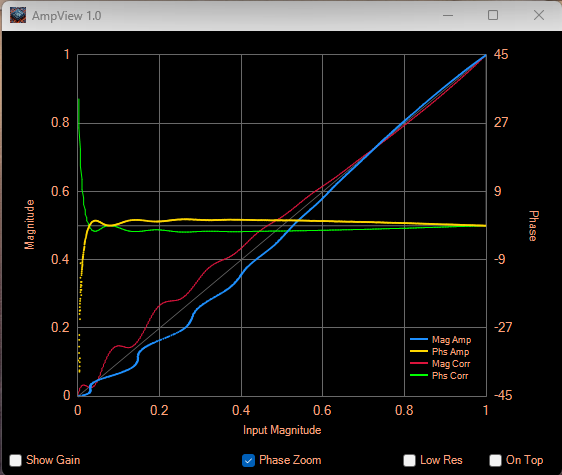
Here's what an abnormal Amp View looks like. All conditions are the same:
What's really weird about this is the condition comes and goes if I power the radio off and then back on. It will start up in either of the two conditions, affects all bands and no amount of fiddling with Thetis changes it and believe me, I've fiddled. Yesterday it was squirrely and tonight it started out normal and I tested for about two hours. Everything was looking just fine and I didn't know what had happened to "fix" the problem but all seemed ok. I then shifted my attention to a slightly loud radio fan. I "turned off the radio switch" in Thetis and then flipped off the radio power. Fan noise went away so I confirmed the noise wasn't coming from a different piece of gear. Powered the radio back on, fan noise returned, turned the "power button" back on in Thetis and everything looked normal. I then did a two-tone calibration and Amp View had turned ugly. Through lots of trial and error, this scenario is very repeatable. I don't do anything in Thetis other than turn the radio "power button" off, I then switch off physical radio power, wait maybe 10 seconds, switch power back on, turn the Thetis "power button" back on and do a calibration. Sometimes, the curves return to normal if they are ugly and sometimes they turn to ugly if they were good. So far, once they are bad, I've been able to return to good although it might take 4 or 5 cycles of turning the radio off and then back on. Going from good to ugly seems to take far fewer cycles - like one!
Of course, the fan has nothing to do with the problem but it is what prompted me to cycle power on the radio and I discovered doing that may either fix or discombobulate my two-tone Amp View calibration and I assume my Pure Signal operation.
The amount of squiggle in my curves after a power cycle does vary from looking great to a little wavy to even more wavy than the screen shot shown above. When really wavy, P.S. cannot find a solution and does not correct. Oddly though, if I change even one of the tones just slightly, P.S. may start to correct.
While changing tone frequencies, I've discovered something maybe everyone else always knows but here's my "normal" curves at 700/1900:
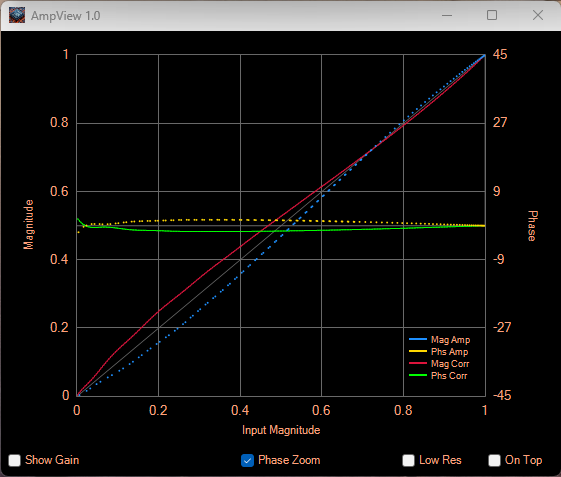
Notice blue and yellow traces are dotted. The "normal" plot at the beginning of this post was at 701/1900. Probably not important but still interesting. May have something to do with my computer if others do not see this same behavior. 800/1800 are also dotted but not if either tone is changed by even 1 Hz, up or down. I've settled on oddball numbers like 803/1811 or 709/1137. Always smooth plot curves.
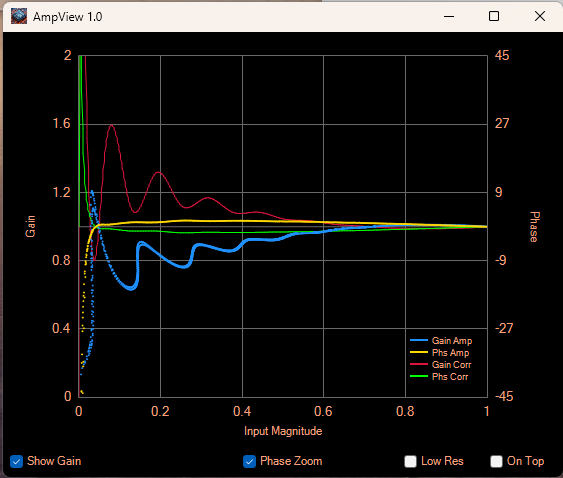
One last set of plots. Here are the gain curves when things look normal vs squiggly:
To quote Tooter Turtle, "Help, Mr. Wizard"! Any ideas on what's wrong with my radio? Thetis is at Ver 2.10.3.11 and firmware version is 2.2.2.
Thanks,
Tom - NS8K

What's really weird about this is the condition comes and goes if I power the radio off and then back on. It will start up in either of the two conditions, affects all bands and no amount of fiddling with Thetis changes it and believe me, I've fiddled. Yesterday it was squirrely and tonight it started out normal and I tested for about two hours. Everything was looking just fine and I didn't know what had happened to "fix" the problem but all seemed ok. I then shifted my attention to a slightly loud radio fan. I "turned off the radio switch" in Thetis and then flipped off the radio power. Fan noise went away so I confirmed the noise wasn't coming from a different piece of gear. Powered the radio back on, fan noise returned, turned the "power button" back on in Thetis and everything looked normal. I then did a two-tone calibration and Amp View had turned ugly. Through lots of trial and error, this scenario is very repeatable. I don't do anything in Thetis other than turn the radio "power button" off, I then switch off physical radio power, wait maybe 10 seconds, switch power back on, turn the Thetis "power button" back on and do a calibration. Sometimes, the curves return to normal if they are ugly and sometimes they turn to ugly if they were good. So far, once they are bad, I've been able to return to good although it might take 4 or 5 cycles of turning the radio off and then back on. Going from good to ugly seems to take far fewer cycles - like one!
Of course, the fan has nothing to do with the problem but it is what prompted me to cycle power on the radio and I discovered doing that may either fix or discombobulate my two-tone Amp View calibration and I assume my Pure Signal operation.
The amount of squiggle in my curves after a power cycle does vary from looking great to a little wavy to even more wavy than the screen shot shown above. When really wavy, P.S. cannot find a solution and does not correct. Oddly though, if I change even one of the tones just slightly, P.S. may start to correct.
While changing tone frequencies, I've discovered something maybe everyone else always knows but here's my "normal" curves at 700/1900:
Notice blue and yellow traces are dotted. The "normal" plot at the beginning of this post was at 701/1900. Probably not important but still interesting. May have something to do with my computer if others do not see this same behavior. 800/1800 are also dotted but not if either tone is changed by even 1 Hz, up or down. I've settled on oddball numbers like 803/1811 or 709/1137. Always smooth plot curves.
One last set of plots. Here are the gain curves when things look normal vs squiggly:
To quote Tooter Turtle, "Help, Mr. Wizard"! Any ideas on what's wrong with my radio? Thetis is at Ver 2.10.3.11 and firmware version is 2.2.2.
Thanks,
Tom - NS8K
Re: What causes the squiggly Pure Signal Amp View?
Here's a correction to a conclusion I came to in my original post.
I concluded that the changes I see in my Amp View when doing a two-tone calibration was caused by cycling power on my radio. That is not correct. While doing additional testing, I discovered the Amp View plot changes when I cycle "power" from Thetis, without cycling the physical power button on the radio. I'm not ending and re-starting Thetis, just cycling the "power" button. Sorry for the mis-information.
My next step is to upgrade to Thetis V2.10.3.12 and initially, start anew to see if anything changes. If no change, I will try firmware 2.2.2A and 2.2.2B.
BTW, my radio is an MKIII with a Cyclone V FPGA.
Thanks,
Tom - NS8K
I concluded that the changes I see in my Amp View when doing a two-tone calibration was caused by cycling power on my radio. That is not correct. While doing additional testing, I discovered the Amp View plot changes when I cycle "power" from Thetis, without cycling the physical power button on the radio. I'm not ending and re-starting Thetis, just cycling the "power" button. Sorry for the mis-information.
My next step is to upgrade to Thetis V2.10.3.12 and initially, start anew to see if anything changes. If no change, I will try firmware 2.2.2A and 2.2.2B.
BTW, my radio is an MKIII with a Cyclone V FPGA.
Thanks,
Tom - NS8K
Re: What causes the squiggly Pure Signal Amp View?
Can you show us some PS curves that are generated from just speaking into the mic (without ever using two-tone)?
Mark
Mark
Re: What causes the squiggly Pure Signal Amp View?
Mark,
Great idea! I was so fixated on the changing two-tone graphs. Here's 75 meters voice at 54 watts peak:
Here's 15 meters voice 44 watts peak output with gain curve followed by two-tone test with gain curve:
Maybe an issue of sorts with two-tone? Voice plots look ok to me. The results are essentially the same on 160 - 10 (didn't test 6). 15 is extremely good, settling in between -60 and -61 dBc for two-tone third order IMD even with the weird squiggly plots.
Not sure what to think.
Tom- NS8K
Great idea! I was so fixated on the changing two-tone graphs. Here's 75 meters voice at 54 watts peak:
Here's 15 meters voice 44 watts peak output with gain curve followed by two-tone test with gain curve:
Maybe an issue of sorts with two-tone? Voice plots look ok to me. The results are essentially the same on 160 - 10 (didn't test 6). 15 is extremely good, settling in between -60 and -61 dBc for two-tone third order IMD even with the weird squiggly plots.
Not sure what to think.
Tom- NS8K
Re: What causes the squiggly Pure Signal Amp View?
Tom,
I asked about the voice calibration because I had read somewhere in this forum that some amps don't like some combinations of two-tone frequencies. Your 15 meter curves suggest you're using frequencies your amp doesn't like.
One nice thing about PureSignal is that it will calibrate perfectly fine to any combination of tones, so I decided early on that I'd just let PS use my voice for calibration, and consequently haven't used two-tone in years.
FWIW here are the specific two tones I was using years ago, they seemed to give my amp the least amount of heartburn. YMMV.
Mark
I asked about the voice calibration because I had read somewhere in this forum that some amps don't like some combinations of two-tone frequencies. Your 15 meter curves suggest you're using frequencies your amp doesn't like.
One nice thing about PureSignal is that it will calibrate perfectly fine to any combination of tones, so I decided early on that I'd just let PS use my voice for calibration, and consequently haven't used two-tone in years.
FWIW here are the specific two tones I was using years ago, they seemed to give my amp the least amount of heartburn. YMMV.
Mark
Re: What causes the squiggly Pure Signal Amp View?
Mark,
Thanks for the reply. I have also read the comment about some amps not liking some two-tone frequency combinations. In my case though, there is no external amp involved and I've tried many different frequency combinations. If I drive an external amp (Elecraft KPA500 or Collins 30L-1) and use two-tone, the plots look pretty much the same and are still wavy on all bands, not just 15. At times though, the two-tone plots also look great both with and without an external amp although the times when that happens seem to be getting less and less frequent.
I suppose I'll take your approach and not calibrate with two-tone although that's hard for me to accept. Something sure seems wrong. One thing you can do with two-tone but not voice is measure your IMD. Some would say that's just a number, get over it but to me it's assurance that PureSignal is working and how well it is working.
WRT amps not liking certain frequency combinations, I've not experienced that but I don't doubt it. What I have experienced is running a two-tone signal through an automatic antenna tuner (Elecraft KAT500) and having the tuner's frequency counter be fooled by the two-tone signal so much so that it read a two-tone signal on 17 meters as 13.9 Mhz. That caused it to switch to a tuning solution from the very bottom of 20 meters thinking it was doing the right thing. Needless to say, red lights started flashing, alarms were set off and I was concerned the amp finals had gone poof! Fortunately, they didn't and after lots of communication, Elecraft acknowledged the KAT500 frequency counter could do that. There is a parameter in the KAT500 called Frequency Counter Distance for Retune which defaults to 10 kHz. I've disabled that function and two-tone is no longer an issue for my tuner.
Again, thanks! Still wondering if others see these squiggly two-tone Amp View plots or am I the only one?
Tom - NS8K
Thanks for the reply. I have also read the comment about some amps not liking some two-tone frequency combinations. In my case though, there is no external amp involved and I've tried many different frequency combinations. If I drive an external amp (Elecraft KPA500 or Collins 30L-1) and use two-tone, the plots look pretty much the same and are still wavy on all bands, not just 15. At times though, the two-tone plots also look great both with and without an external amp although the times when that happens seem to be getting less and less frequent.
I suppose I'll take your approach and not calibrate with two-tone although that's hard for me to accept. Something sure seems wrong. One thing you can do with two-tone but not voice is measure your IMD. Some would say that's just a number, get over it but to me it's assurance that PureSignal is working and how well it is working.
WRT amps not liking certain frequency combinations, I've not experienced that but I don't doubt it. What I have experienced is running a two-tone signal through an automatic antenna tuner (Elecraft KAT500) and having the tuner's frequency counter be fooled by the two-tone signal so much so that it read a two-tone signal on 17 meters as 13.9 Mhz. That caused it to switch to a tuning solution from the very bottom of 20 meters thinking it was doing the right thing. Needless to say, red lights started flashing, alarms were set off and I was concerned the amp finals had gone poof! Fortunately, they didn't and after lots of communication, Elecraft acknowledged the KAT500 frequency counter could do that. There is a parameter in the KAT500 called Frequency Counter Distance for Retune which defaults to 10 kHz. I've disabled that function and two-tone is no longer an issue for my tuner.
Again, thanks! Still wondering if others see these squiggly two-tone Amp View plots or am I the only one?
Tom - NS8K
Re: What causes the squiggly Pure Signal Amp View?
Tom,
There is one other possibility that I haven't mentioned before now...
I had a very similar-looking issue with the PureSignal curves on my radio 2 years ago. It wound up being a bad PA in the final.
Here's the thread in this forum on my pursuits (with lots of PS pics):
viewtopic.php?t=4777
Long story short, I sent the radio to Doug and he replaced both devices in the final (per my request, as I wanted a known balanced final). Been smooth sailing ever since.
Mark
There is one other possibility that I haven't mentioned before now...
I had a very similar-looking issue with the PureSignal curves on my radio 2 years ago. It wound up being a bad PA in the final.
Here's the thread in this forum on my pursuits (with lots of PS pics):
viewtopic.php?t=4777
Long story short, I sent the radio to Doug and he replaced both devices in the final (per my request, as I wanted a known balanced final). Been smooth sailing ever since.
Mark
Re: What causes the squiggly Pure Signal Amp View?
The "squiggly" waveforms are generally indicative of either a hardware issue (cable, amp, etc.), or bad data, which again would be due to a hardware issue (cable, coupler, etc.).
It's very unlikely the versions of Thetis and firmware you are running have anything to do with this. Also, without having an external amplifier, we can dismiss tone selection as having any bearing on the problem. The standard 700 and 1900 Hz tone pair should be fine.
Before looking for "zebras" (something rare and unusual) try looking for "horses" (boring and mundane). VSWR is obviously not a core issue, since this problem occurs into a dummy load. But are all your cables healthy? Any loose RF connectors on the back of the 7000? What do your station's grounding and bonding provisions look like?
Finally, the dotted or dashed characteristic of the lines is not a problem and need not be addressed. It is typical of a any two-tone waveform. When two tones are combined, particularly non-harmonically related ones as is the standard for two-tone measurements, the two waveforms will combine such that there is an AM modulation imposed per the mathematical relationship as shown in the following figure below. This causes the dotted characteristic as shown on the ampview display.
Two-tone is not necessary for calibration with SSB phone. Normal voice modulation is sufficient. However, remember that the audio chain both internal and external to Thetis must cause the ALC to peak at greater than or equal to 0 dB fairly frequently or PureSignal will not kick off a measurement. Two-tone is most useful for a) formal measurements, b) performing a "single cal", which is often useful for difficult "digital" waveforms, and c) adjusting amplifier drive level.
Finally, and not really relevant, but fun to discuss, is how to modify two-tone settings so that you get the same behavior and benefits without "singing the song of our people".
You will find that a tone combination of 70 and 190 Hz is useful for all of the above except formal testing and sounds quite subtle on the air compared to the standard 700 and 1900 Hz tone pair.
It's very unlikely the versions of Thetis and firmware you are running have anything to do with this. Also, without having an external amplifier, we can dismiss tone selection as having any bearing on the problem. The standard 700 and 1900 Hz tone pair should be fine.
Before looking for "zebras" (something rare and unusual) try looking for "horses" (boring and mundane). VSWR is obviously not a core issue, since this problem occurs into a dummy load. But are all your cables healthy? Any loose RF connectors on the back of the 7000? What do your station's grounding and bonding provisions look like?
Finally, the dotted or dashed characteristic of the lines is not a problem and need not be addressed. It is typical of a any two-tone waveform. When two tones are combined, particularly non-harmonically related ones as is the standard for two-tone measurements, the two waveforms will combine such that there is an AM modulation imposed per the mathematical relationship as shown in the following figure below. This causes the dotted characteristic as shown on the ampview display.
Two-tone is not necessary for calibration with SSB phone. Normal voice modulation is sufficient. However, remember that the audio chain both internal and external to Thetis must cause the ALC to peak at greater than or equal to 0 dB fairly frequently or PureSignal will not kick off a measurement. Two-tone is most useful for a) formal measurements, b) performing a "single cal", which is often useful for difficult "digital" waveforms, and c) adjusting amplifier drive level.
Finally, and not really relevant, but fun to discuss, is how to modify two-tone settings so that you get the same behavior and benefits without "singing the song of our people".
Re: What causes the squiggly Pure Signal Amp View?
Scott / Mark,
Thanks to both of you for chiming in. Other life commitments have gotten in the way of ham radio but I have taken the time to separate the 7000 from all other equipment so all that is attached is power, a bonding wire, the Ethernet cable from the shack PC and a coax cable to the dummy load. My dummy load is a Bird 8251 and I also have a lower power 175 watt Sola. Both are high quality loads that I have confidence in. I've tested with each load and two different cables and the results are the same, at times perfect plots and at other times, plots so bad that PS is unable to lock in a correction. On a lark, I also swapped out the ethernet cable and no change there either.
As for bonding, all shack equipment is independently bonded to a common point which is connected to AC power safety ground. The shack is on the second floor so grounding is not ideal. The bonding common point is also connected to about 15 feet of heavy cable to ground rods driven into the earth.
In the shack I have two radios, two amplifiers, wattmeter for amp input power, LP-100A wattmeter for output power (with -47 dB coupler tap), etc, etc. Multiple coax switches are involved as well as multiple coax patch cords (LMR-240) so removing all that from the "system" was a great suggestion.
My next step will be to introduce an externally generated two-tone signal into the radio. I have a dual channel signal generator that will do that nicely and another option would be to generate that signal in the computer and couple it to the radio audio input.
I'll post those results here.
Scott, on a different note, thanks for all the posts about implementing ASIO audio with the Apache Labs radios. I purchased a Behringer 202hd and a nice mic and setup was a piece of cake as they say. Kudos go out to everyone on the team that made that change happen. It's fantastic. I'm also using the 202hd and some software to provide audio into my 7300 with great results there too.
Tom - NS8K
Thanks to both of you for chiming in. Other life commitments have gotten in the way of ham radio but I have taken the time to separate the 7000 from all other equipment so all that is attached is power, a bonding wire, the Ethernet cable from the shack PC and a coax cable to the dummy load. My dummy load is a Bird 8251 and I also have a lower power 175 watt Sola. Both are high quality loads that I have confidence in. I've tested with each load and two different cables and the results are the same, at times perfect plots and at other times, plots so bad that PS is unable to lock in a correction. On a lark, I also swapped out the ethernet cable and no change there either.
As for bonding, all shack equipment is independently bonded to a common point which is connected to AC power safety ground. The shack is on the second floor so grounding is not ideal. The bonding common point is also connected to about 15 feet of heavy cable to ground rods driven into the earth.
In the shack I have two radios, two amplifiers, wattmeter for amp input power, LP-100A wattmeter for output power (with -47 dB coupler tap), etc, etc. Multiple coax switches are involved as well as multiple coax patch cords (LMR-240) so removing all that from the "system" was a great suggestion.
My next step will be to introduce an externally generated two-tone signal into the radio. I have a dual channel signal generator that will do that nicely and another option would be to generate that signal in the computer and couple it to the radio audio input.
I'll post those results here.
Scott, on a different note, thanks for all the posts about implementing ASIO audio with the Apache Labs radios. I purchased a Behringer 202hd and a nice mic and setup was a piece of cake as they say. Kudos go out to everyone on the team that made that change happen. It's fantastic. I'm also using the 202hd and some software to provide audio into my 7300 with great results there too.
Tom - NS8K
Re: What causes the squiggly Pure Signal Amp View?
It's been a while but I can now devote more time to this issue. Interconnecting cables, switches, etc. have all been eliminated as sources so my next step is to generate the two-tone test signal externally. The results of these tests are interesting. Here's my setup:
Radio - ANAN-7000DLE MKIII with ASIO audio setup
Thetis v2.10.3.12
Firmware v2.2.2 Protocol 2
Function Generator - Koolertron 2 Channel 60 MHz Function Generator
Audio Interface - Behringer UMC202HD
Load - Bird 8251
Wattmeter - LP-100A
Two-Tone Frequencies - 1,137 and 709 Hz
I patched each output channel from the signal generator individually and independently to the two input channels of the 202HD. I did not combine the test signals using a resistor network. I let the audio interface do the combining and isolating. I set the level of each tone identically to provide a -6 dB single tone input signal to the radio. With both tones active, the input level is 0 dB. As mentioned before, at times the radio will turn on and produce perfectly smooth magnitude and gain plots in AmpView. Turning the radio off and back on can also result in plots so bad that PureSignal cannot achieve a steady correction. For this test I cycled the radio a few times to get moderately bad squiggly plots. Peak two-tone RF output was 40 watts on 75 meters. The squigglyness of the plots do not change with operating frequency or output levels. When they are bad, they are bad. If I drive an external amp, the plots are essentially the same.
Here are the Magnitude and Gain plots using the internally generated two-tone signal:
Here are the Magnitude and Gain plots using the externally generated two-tone signal:
Not exactly the same but very close. It seems my externally generated signal is acceptable. Pure Signal is correcting in both scenarios and IMD suppression is essentially the same at -54 dBc
It seems the limit for attaching screenshots is 5. To tell the story, I need 6. Story continued in next post.
Tom - NS8K
Radio - ANAN-7000DLE MKIII with ASIO audio setup
Thetis v2.10.3.12
Firmware v2.2.2 Protocol 2
Function Generator - Koolertron 2 Channel 60 MHz Function Generator
Audio Interface - Behringer UMC202HD
Load - Bird 8251
Wattmeter - LP-100A
Two-Tone Frequencies - 1,137 and 709 Hz
I patched each output channel from the signal generator individually and independently to the two input channels of the 202HD. I did not combine the test signals using a resistor network. I let the audio interface do the combining and isolating. I set the level of each tone identically to provide a -6 dB single tone input signal to the radio. With both tones active, the input level is 0 dB. As mentioned before, at times the radio will turn on and produce perfectly smooth magnitude and gain plots in AmpView. Turning the radio off and back on can also result in plots so bad that PureSignal cannot achieve a steady correction. For this test I cycled the radio a few times to get moderately bad squiggly plots. Peak two-tone RF output was 40 watts on 75 meters. The squigglyness of the plots do not change with operating frequency or output levels. When they are bad, they are bad. If I drive an external amp, the plots are essentially the same.
Here are the Magnitude and Gain plots using the internally generated two-tone signal:
Here are the Magnitude and Gain plots using the externally generated two-tone signal:
Not exactly the same but very close. It seems my externally generated signal is acceptable. Pure Signal is correcting in both scenarios and IMD suppression is essentially the same at -54 dBc
It seems the limit for attaching screenshots is 5. To tell the story, I need 6. Story continued in next post.
Tom - NS8K
Re: What causes the squiggly Pure Signal Amp View?
Continued...
I don't know why but at some time while I was generating the two-tone signal externally, I changed the level of one of the tones from 1.950 to 1.990 Volts. Thetis still indicated a 0 dB input level, PureSignal was still correcting, RF output might have increased a small amount if at all but here are what the plots looked like:
What a change! I can duplicate this behavior on any band and at any output level. I don't know exactly what this all means but these plots look very good. Perhaps almost perfect. So, I excitedly went to the Setup Tests tab to see if I could adjust the two-tone levels and I can but 0 dB is max and each tone cannot be adjusted independently. I don't know if adjusting the levels to not be identical would change anything or not or if it is even possible to do that. Does anyone have any ideas?
Thanks,
Tom - NS8K
I don't know why but at some time while I was generating the two-tone signal externally, I changed the level of one of the tones from 1.950 to 1.990 Volts. Thetis still indicated a 0 dB input level, PureSignal was still correcting, RF output might have increased a small amount if at all but here are what the plots looked like:
What a change! I can duplicate this behavior on any band and at any output level. I don't know exactly what this all means but these plots look very good. Perhaps almost perfect. So, I excitedly went to the Setup Tests tab to see if I could adjust the two-tone levels and I can but 0 dB is max and each tone cannot be adjusted independently. I don't know if adjusting the levels to not be identical would change anything or not or if it is even possible to do that. Does anyone have any ideas?
Thanks,
Tom - NS8K
Re: What causes the squiggly Pure Signal Amp View?
It might be worth taking a different approach to this. Rather than stress over what the curves look like, it would probably be better to observe the actual performance of linearization by measuring the IMD suppression achieved. Obviously this is done by looking at the frequency spectrum.
IMD measurements will be most accurate and repeatable by using the built-in Thetis two-tone function, and the standard, default frequencies of 700 and 1900 Hz.
It will be important to ensure that the zoom, center frequency, and amplitude scaling of the transmit DUP display be adjusted for proper visibility of the output, and to remain the same for all measurements. Turning on the Blobs (peak blobs) feature will make it easy to see the amplitude of each peak.
Try to get the radio into the two states you seem to be observing (smooth vs. not-smooth AmpView response) and see how IMD performance may be differing.
IMD measurements will be most accurate and repeatable by using the built-in Thetis two-tone function, and the standard, default frequencies of 700 and 1900 Hz.
It will be important to ensure that the zoom, center frequency, and amplitude scaling of the transmit DUP display be adjusted for proper visibility of the output, and to remain the same for all measurements. Turning on the Blobs (peak blobs) feature will make it easy to see the amplitude of each peak.
Try to get the radio into the two states you seem to be observing (smooth vs. not-smooth AmpView response) and see how IMD performance may be differing.
Re: What causes the squiggly Pure Signal Amp View?
Tom,
I don't understand why you keep focusing on the two-tone results. As I stated earlier, and as you've since observed yourself in this thread, any two specific tones may give widely disparate results in the PureSignal graph, as you've seen just from changing the 1900 tone to 1950!
Besides, as soon as you start speaking into the mic the PS algorithm will be constantly re-calculating and updating the correction curves real-time anyway, every time the ALC Group meter hits zero.
Personally I've seen PS struggle with many different combinations of two-tone input, so as I stated earlier I've never even used the two tone feature, I just talk into the mic and watch the splatter instantly clean up in the spectrum and waterfall in real-time.
You yourself have observed that the curves and IMD3 numbers look beautiful on voice.
So IMO as long as the PS algorithm is correcting for the nonlinearity, the specific shape of the graph curves is irrelevant. What you really want to see is very clean skirts in your transmitted signal. If that's what you're seeing then PS is doing its job.
Mark
I don't understand why you keep focusing on the two-tone results. As I stated earlier, and as you've since observed yourself in this thread, any two specific tones may give widely disparate results in the PureSignal graph, as you've seen just from changing the 1900 tone to 1950!
Besides, as soon as you start speaking into the mic the PS algorithm will be constantly re-calculating and updating the correction curves real-time anyway, every time the ALC Group meter hits zero.
Personally I've seen PS struggle with many different combinations of two-tone input, so as I stated earlier I've never even used the two tone feature, I just talk into the mic and watch the splatter instantly clean up in the spectrum and waterfall in real-time.
You yourself have observed that the curves and IMD3 numbers look beautiful on voice.
So IMO as long as the PS algorithm is correcting for the nonlinearity, the specific shape of the graph curves is irrelevant. What you really want to see is very clean skirts in your transmitted signal. If that's what you're seeing then PS is doing its job.
Mark
Re: What causes the squiggly Pure Signal Amp View?
Scott,
Thanks for your reply. Here are my AmpView settings and 3 twotone IMD screenshots with varying degrees of squiggled AmpView plots from very bad to good. All tests on 3,900 kHz at 40 watts PEP output. Tones were 1,900 and 700 Hz.
During the first test, the feedback LED indicator was flickering slightly. It was solid during the second two tests. Thetis always showed 0 dB. In the first test, PS could not maintain a solid correction. IMD would slowly increase, the correcting LED would go out, there would be a big burp on the screen and correcting would come back on and start the drift again. The cycle repeated every 5 seconds. The second and third tests were steady, no loss of correction.
I appreciate your thoughts.
Thanks,
Tom - NS8K
Thanks for your reply. Here are my AmpView settings and 3 twotone IMD screenshots with varying degrees of squiggled AmpView plots from very bad to good. All tests on 3,900 kHz at 40 watts PEP output. Tones were 1,900 and 700 Hz.
During the first test, the feedback LED indicator was flickering slightly. It was solid during the second two tests. Thetis always showed 0 dB. In the first test, PS could not maintain a solid correction. IMD would slowly increase, the correcting LED would go out, there would be a big burp on the screen and correcting would come back on and start the drift again. The cycle repeated every 5 seconds. The second and third tests were steady, no loss of correction.
I appreciate your thoughts.
Thanks,
Tom - NS8K
Re: What causes the squiggly Pure Signal Amp View?
First things first: those are good results regardless. All IMD products are -48 dBc or better in the "bad" case. That's tough to complain about! However, that doesn't mean you shouldn't seek even better performance, and clearly performance approaching -60 dBc is possible as can be seen in the "good" trials.NS8K wrote: Fri Feb 06, 2026 3:07 am
During the first test, the feedback LED indicator was flickering slightly. It was solid during the second two tests. Thetis always showed 0 dB.
Questions:
- Under the same test conditions (frequency, RF power, tones), to what value does the auto-attenuate algorithm drive the step attenuator to? This will show up on the ATT control on the main console when transmitting and PS is active.
- Exactly what reading were you reporting when you wrote "Thetis always showed 0 dB."?
Suggestion:
- Enable the "Show 2Tone measurements" option in the linearity menu. Now that we've seen a spectral display screen shot and we know things are generally working OK, we can just work with the numbers.
- I have a couple of other suggestions but would like to know the auto-attenuate step attenuator values for a "good" case and a "bad" case before making them, as those suggestions might change based on your results.
Re: What causes the squiggly Pure Signal Amp View?
Scott,
Thank you for your comments. In all of the 3 cases from last night, the internal attenuator shows 18 dB. The 0 dB reading in Thetis is the ALC group.
I agree, -48 dBc is good but the second and third measurements show the radio can do much better as you pointed out. In particular, the relatively high level of the 5th through 13th order IMD products in the first measurement are very surprising (if not concerning) to me. I understand those are still very small numbers but compared to test 2 and 3 seem to indicate an issue.
One thing to note if you didn't catch it is in test 1, the background of the 157 feedback number is not a vivid green like it is in tests 2&3. I don't know if that is significant or not. Of course, when I select the screen capture, the display freezes and perhaps I did that at an exact moment where the feedback level LED was unlit as it was flickering. By flickering, I'd say the LED was on 90+ % of the time. I had to watch carefully to see the black flicker.
One more piece of information is that the XTVR jumper from J31 to J32 has been removed in my radio. This issue existed before removing the jumper.
Again, thank you for your help.
Tom - NS8K
Thank you for your comments. In all of the 3 cases from last night, the internal attenuator shows 18 dB. The 0 dB reading in Thetis is the ALC group.
I agree, -48 dBc is good but the second and third measurements show the radio can do much better as you pointed out. In particular, the relatively high level of the 5th through 13th order IMD products in the first measurement are very surprising (if not concerning) to me. I understand those are still very small numbers but compared to test 2 and 3 seem to indicate an issue.
One thing to note if you didn't catch it is in test 1, the background of the 157 feedback number is not a vivid green like it is in tests 2&3. I don't know if that is significant or not. Of course, when I select the screen capture, the display freezes and perhaps I did that at an exact moment where the feedback level LED was unlit as it was flickering. By flickering, I'd say the LED was on 90+ % of the time. I had to watch carefully to see the black flicker.
One more piece of information is that the XTVR jumper from J31 to J32 has been removed in my radio. This issue existed before removing the jumper.
Again, thank you for your help.
Tom - NS8K
Re: What causes the squiggly Pure Signal Amp View?
Here is a video of the spectrum when the plots are very squiggly:
You will see IMD starts out somewhat poor and then it stops and tries again. My original screen capture was done during this first cycle so it showed the relatively poor IMD. From the second cycle on, things look much better but are still unstable. You can also see the feedback level flickering. In all cycles, the high order products (> 7th order) are present.
Tom - NS8K
You will see IMD starts out somewhat poor and then it stops and tries again. My original screen capture was done during this first cycle so it showed the relatively poor IMD. From the second cycle on, things look much better but are still unstable. You can also see the feedback level flickering. In all cycles, the high order products (> 7th order) are present.
Tom - NS8K
Re: What causes the squiggly Pure Signal Amp View?
That video isn't really showing anything, other than things are unstable.
With the step atten question answered (18 dB, which seems quite reasonable), I'll proceed to the suggestions I was holding in reserve, which is to try changing a few settings in the Linearity menu.
First, PIN should always remain ON.
Second, try with MAP OFF and STBL ON.
Third, try with MAP ON and STBL OFF.
See if any of those changes make a difference.
If you make another video, it would be great to be able to watch the ALC Group meter. With two-tone it should be essentially pinned at exactly 0dB and never vary more than maybe 0.1 dB.
If all of the above fails to make any improvements, then I'm starting to think about issues with the LAN connection between the PC and the 7000, but first things first.
With the step atten question answered (18 dB, which seems quite reasonable), I'll proceed to the suggestions I was holding in reserve, which is to try changing a few settings in the Linearity menu.
First, PIN should always remain ON.
Second, try with MAP OFF and STBL ON.
Third, try with MAP ON and STBL OFF.
See if any of those changes make a difference.
If you make another video, it would be great to be able to watch the ALC Group meter. With two-tone it should be essentially pinned at exactly 0dB and never vary more than maybe 0.1 dB.
If all of the above fails to make any improvements, then I'm starting to think about issues with the LAN connection between the PC and the 7000, but first things first.